FAQ Topic: Time Reporting
How to request time off and view leave balances.
Navigation: Login Manager Self Service Time Management Report Time Timesheet Butler University Payroll Procedure Summary Reported time and absence requests for the current period must be approved by noon on Monday of each week. The time entries are then converted to “Payable Time” in the payroll system to generate pay checks. Time that is not …
Continue reading
Permanent link to this article: http://blogs.butler.edu/mybutlerhelp/question/how-do-i-view-all-of-my-employees-timesheets/
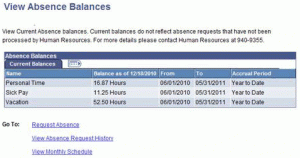
Login and click Self Service Time Reporting View Time > Absence Balances Your absence balance details are displayed. Please note the date listed in the Balance as of column header: the displayed balances only account for absences taken up to this date. Balances are generally updated each week on Monday. Absences are not deducted from …
Continue reading
Permanent link to this article: http://blogs.butler.edu/mybutlerhelp/question/how-do-i-see-how-much-time-off-i-have-available/
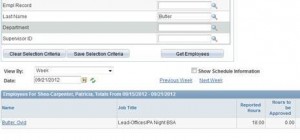
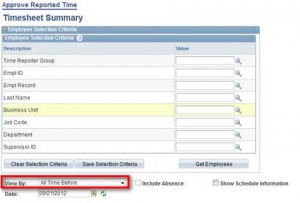
Approving Reported Time Navigation: Login Manager Self Service Time Management Approve Time and Exceptions Reported Time Butler University Payroll Procedure Summary Reported time and absence requests for the current period must be approved by noon on Monday of each week. The time entries are then converted to “Payable Time” in the payroll system to generate pay …
Continue reading
Permanent link to this article: http://blogs.butler.edu/mybutlerhelp/question/how-do-i-approve-my-employees-timesheet/
If there is an error in your absence balance, please contact Human Resources (x9355) so that the necessary adjustments can be made.
Permanent link to this article: http://blogs.butler.edu/mybutlerhelp/question/how-do-i-make-corrections-or-changes-to-my-absence-balances/
If the absence has not yet been approved by your supervisor, ask him/her to Deny or Push Back the request. This will allow you to edit it and re-submit it. If your supervisor has approved it, contact Human Resources (x9355) to have it pushed back. You can find the absence request in your absence history …
Continue reading
Permanent link to this article: http://blogs.butler.edu/mybutlerhelp/question/how-do-i-cancel-an-absence-request/
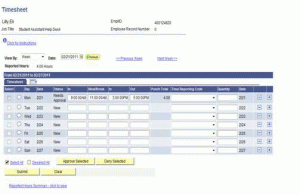
How to Use Timesheet (Video) Login and click Self Service Time Reporting Report Time Timesheet. If you have more than one job, you will be presented a list of your active jobs. Click the job you wish to report time for. Enter the time you reported to work in the IN column. Enter the time …
Continue reading
Permanent link to this article: http://blogs.butler.edu/mybutlerhelp/question/how-do-i-fill-out-my-timesheet-bi-weekly-staff-students-in-specific-jobs/
When an employee’s time indicates “Approval in Process” the Payroll department must fix the approver’s security to allow the approval. Contact the Payroll department for assistance.
Permanent link to this article: http://blogs.butler.edu/mybutlerhelp/question/why-cant-i-approve-time-that-says-approval-in-process/
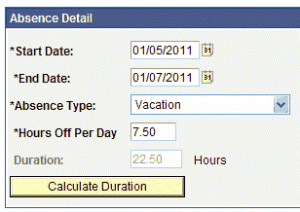
In My.Butler, navigate to Self Service Time Reporting Report Time > Absence Request. Select a start and end date; click on the to select a date from a calendar view. For single-day absences, the start and end dates should be the same. For multiple-day absences, a single request should only include regularly scheduled workdays, not …
Continue reading
Permanent link to this article: http://blogs.butler.edu/mybutlerhelp/question/how-do-i-send-a-request-for-time-off-through-my-butler/
Only approved time can be processed by payroll for payment. Time can be approved via My.Butler from any computer with internet access. Time can also be approved prior to the Monday, noon deadline, if desired. We recommend each department have a backup approver/time administrator. Contact Payroll to make backup approver arrangements or an arrangement for …
Continue reading
Permanent link to this article: http://blogs.butler.edu/mybutlerhelp/question/how-do-i-get-my-employees-time-approved-if-i-will-be-out-of-the-office/
Absence management is only used for vacation, personal time, sick time, bereavement, and jury duty. Any other types of absences should be addressed to the Human Resources Department directly.
Permanent link to this article: http://blogs.butler.edu/mybutlerhelp/question/what-types-of-leave-can-i-request-through-my-butler/
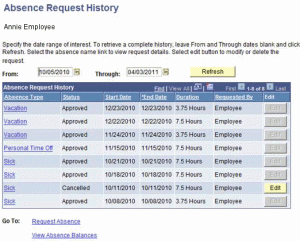
Login and click Self Service Time Reporting View Time > Absence Request History. Your absence request history is displayed. Note that you may wish to change the From and Through dates on the page and click the button to see a different time period.
Permanent link to this article: http://blogs.butler.edu/mybutlerhelp/question/how-do-i-see-my-absence-request-history/
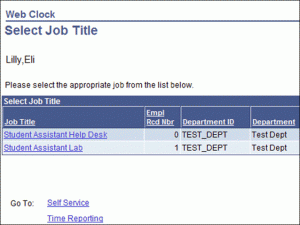
How to complete the timesheet (Video) Login and navigate to Self Service Time Reporting Report Time Timesheet.Note: If you have more than one job, a list of your active jobs will display. Click the job title for the job you are reporting in to work for. Enter the time you reported to work in the …
Continue reading
Permanent link to this article: http://blogs.butler.edu/mybutlerhelp/question/how-do-i-complete-the-timesheet/
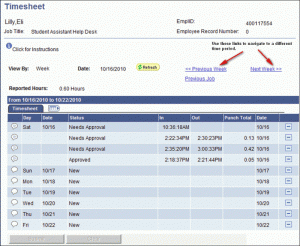
Login and navigate to Self Service Time Reporting Report Time Timesheet. Your current timesheet will be displayed. Note: If you have more than one job, a list of your active jobs will display. Click the job title that you want to see time entries for. To view time entries for another week, click on the …
Continue reading
Permanent link to this article: http://blogs.butler.edu/mybutlerhelp/question/how-do-i-see-when-i-clocked-in-or-out-webclock/
Notify your supervisor in writing or via email of the correction that is needed on your timesheet.
Permanent link to this article: http://blogs.butler.edu/mybutlerhelp/question/what-do-i-do-if-i-need-to-change-my-time-webclock/
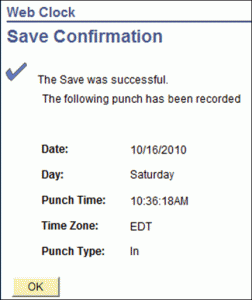
How to Clock In Using Webclock (Video) Login and navigate to Self Service Time Reporting Report Time Web Clock. Your punch clock screen displays. Note: If you have more than one job, a list of your active jobs will display. Click the job title for the job you are reporting in to work for. From …
Continue reading
Permanent link to this article: http://blogs.butler.edu/mybutlerhelp/question/how-do-i-clock-in-for-my-job-webclock/